组合模式:允许将对象组合成树型结构来表现“整体/部分”层次结构。组合能让一致的方式处理个别对象以及对象组合。
接上一篇**设计模式系列之十迭代器模式**的业务逻辑,现在集团公司业务扩张,新增了湖南分公司,那么采用迭代器模式可以很方便的打印出湖南分公司的所有部门。
一、新需求实现
1
2
3
4
5
6
7
8
9
10
11
12
13
14
15
16
|
public class HNBranch {
ArrayList<Dept> depts;
public HNBranch(){
depts = new ArrayList<Dept>();
depts.add(new Dept("湖南-财务部"));
depts.add(new Dept("湖南-开发部"));
}
public Iterator createrIterator(){
return new HNBranchIterator(depts);
}
}
|
1
2
3
4
5
6
7
8
9
10
11
12
13
14
15
16
17
18
19
20
21
22
23
24
|
public class HNBranchIterator implements Iterator{
ArrayList<Dept> depts;
int position = 0;
public HNBranchIterator(ArrayList<Dept> depts){
this.depts = depts;
}
@Override
public boolean hasNext() {
if(position>=depts.size() || depts.get(position)==null){
return false;
}else{
return true;
}
}
@Override
public Object next() {
Dept dept = depts.get(position);
position = position + 1;
return dept;
}
}
|
1
2
3
4
5
6
7
8
9
10
11
12
13
14
15
16
17
18
19
20
| public class TestNew {
public static void main(String[] args) {
Iterator BJ = new BJBranch().createrIterator();
Iterator SH = new SHBranch().createrIterator();
Iterator HN = new HNBranch().createrIterator();
printDeptName(BJ);
printDeptName(SH);
printDeptName(HN);
}
private static void printDeptName(Iterator iterator){
while(iterator.hasNext()){
Dept dept = (Dept) iterator.next();
System.out.println(dept.getName());
}
}
}
|
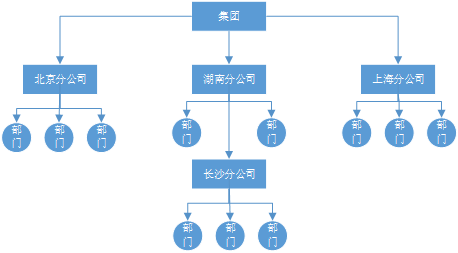
依次类推,如果再设立其它省份的分公司一样的可以很快增加上去。但是,如果需要在湖南分公司下再设立下隶属于湖南分公司的长沙分公司呢?此时,整个结构变为一棵树型结构。
二、组合模式使用
可使用组合模式来表现“整体/部分”层次结构。
1
2
3
4
5
6
7
8
9
10
11
|
public abstract class Component {
public abstract String getName();
public abstract void print();
public void add(Component component) {
throw new UnsupportedOperationException();
}
}
|
1
2
3
4
5
6
7
8
9
10
11
12
13
14
15
16
17
18
19
20
21
22
23
24
25
26
27
28
|
public class Branch extends Component{
ArrayList<Component> components;
private String name;
public Branch(String name){
this.name = name;
components = new ArrayList<Component>();
}
public void add(Component component){
components.add(component);
}
public String getName(){
return this.name;
}
public void print(){
System.out.println(getName());
System.out.println("----------------------");
for(Component com:components){
com.print();
}
}
}
|
1
2
3
4
5
6
7
8
9
10
11
12
13
14
15
16
17
|
public class Dept extends Component{
private String name;
public Dept(String name){
this.name= name;
}
public String getName(){
return this.name;
}
public void print(){
System.out.println(getName());
System.out.println("----------------------");
}
}
|
1
2
3
4
5
6
7
8
9
10
11
12
13
14
15
16
17
18
19
20
21
22
23
|
public class Test {
public static void main(String[] args) {
Component BJBranch = new Branch("北京分公司");
BJBranch.add(new Dept("北京-财务部"));
Component SHBranch = new Branch("上海分公司");
SHBranch.add(new Dept("上海-财务部"));
Component HNBranch = new Branch("湖南分公司");
HNBranch.add(new Dept("湖南-财务部"));
Component CS = new Branch("长沙子公司");
CS.add(new Dept("长沙-财务部"));
HNBranch.add(CS);
Component root = new Branch("集团公司");
root.add(BJBranch);
root.add(SHBranch);
root.add(HNBranch);
root.print();
}
}
|
从上面的代码中可以看出,核心在于父节点与叶子节点都属于Component,才能组合在一起,实现递归打印。
上一篇:设计模式系列之十迭代器模式
下一篇:设计模式系列之十二状态模式
留言
欢迎交流想法。留言会通过 GitHub Issues 保存,首次使用需要登录 GitHub。